

What is prompt management? Versioning, collaboration, and deployment for prompts
Production LLM applications depend on prompts that change frequently. A support chatbot might require tone adjustments after customer feedback, a document summarizer often requires new instructions when the underlying model changes, or a code assistant may need guardrails after generating unsafe outputs.
Each change affects how users experience the product, yet many teams update prompts across multiple locations without reliable version control, review, or documentation. This makes it difficult to determine what is running in production, understand why behavior has changed, and find a quick fix when issues arise.
Prompt management brings structure to this process by treating prompts as production assets that can be versioned, reviewed, tested, and deployed independently of application code. Teams that adopt prompt management ship changes faster because they can iterate without fear of breaking production, and they catch regressions before users notice them.
This guide covers the core components of prompt management, explains how each component works in practice, and provides a reference workflow for moving prompts from prototype to production.
Why prompt management is important
Prompts behave differently from traditional application code. Small wording changes can significantly alter model behavior, and the same prompt can produce different results across model versions. These characteristics introduce risks that standard development practices are not designed to handle.
Version chaos appears when teams lack a clear tracking system. Multiple versions of the same prompt spread across repositories, documents, and chat threads. When an AI feature breaks in production, engineers often spend hours trying to identify which version is actually running. A single source of truth eliminates version fragmentation by clearly identifying and tracing every prompt version.
Deployment friction increases when prompts are embedded directly in application code. Each prompt update requires a full deployment cycle and is often bundled with unrelated code changes. This makes it difficult to isolate the impact of prompt modifications. Decoupling prompts from application releases allows teams to update behavior safely without redeploying code.
Invisible quality degradation occurs when prompt changes rely on anecdotal feedback rather than metrics. Teams may believe an update helped, even when it quietly reduced accuracy or safety. Systematic evaluation connects prompt changes to measurable outcomes and exposes regressions before users encounter them.
A production prompt consists of several components that must be managed together. Instructions define the task, context provides supporting information, and variables enable dynamic inputs. Model settings such as temperature and max tokens further shape responses. Managing these elements as a single, version-controlled unit with clear deployment controls forms the foundation of effective prompt management.
How prompt versioning works
Prompt versioning applies source control principles to prompts, treating each change as a trackable event with clear visibility into what changed and where it is deployed.
Unique version identifiers: Each prompt version receives a unique identifier when saved. Loading a specific version always returns the exact same prompt text, model settings, and metadata, which makes production behavior reproducible and debuggable.
Version immutability: Saved prompt versions never change. Any modification creates a new version instead of overwriting an existing one. This protects against accidental edits and enables reliable rollback by keeping all previous versions intact.
Diff visibility: Teams can compare prompt versions side by side and see exactly what changed between iterations. Because small wording differences can cause large shifts in model behavior, clear diffs reduce trial-and-error and speed up debugging.
Environment separation: Prompt versions progress through development, staging, and production as distinct stages. Each environment runs its own active version, and changes advance only after validation. This prevents untested prompts from reaching users and allows instant rollback by switching to a previously approved version.
Labeling conventions: As version counts grow, structured naming helps teams navigate prompt history. Labels that include purpose and version context make it easier to understand what each prompt does and trace issues back to specific changes.
How to enable cross-functional collaboration on prompts
Prompts involve more stakeholders than traditional code. Engineers build infrastructure, product managers define user experience, domain experts contribute specialized knowledge, and compliance teams review outputs. Effective prompt management enables all these roles to contribute without bottlenecks.
The table below outlines the core capabilities required to support safe, cross-functional collaboration on prompts.
| Capability | Purpose |
|---|---|
| Review workflows | Ensure that prompt changes are reviewed and approved before deployment, so that quality, safety, and compliance checks are conducted consistently. |
| Role-based access control | Separate view, edit, and deploy permissions so contributors can participate without risking production stability. |
| Audit trails | Record every prompt change, including the author, timestamp, and content history, to support debugging, compliance, and incident review. |
| Shared libraries | Provide reusable prompt templates for common instructions, tone guidelines, and safety guardrails to reduce duplication. |
| Unified workspaces | Enable engineers, product teams, and domain experts to collaborate within a single interface without context switching. |
| Bidirectional synchronization | Keep prompt changes in code and UI in sync, so updates remain consistent across tools and environments. |
How to deploy prompts safely to production
Safe prompt deployment balances speed with control for teams that need to ship updates quickly while minimizing the risk of breaking production behavior or degrading output quality.
Decoupling from application code
Instead of embedding prompts directly in application code, production systems fetch active prompts from a centralized registry at runtime. Prompt updates become operational changes that skip full code deployments. Teams can adjust behavior without bundling prompt updates with unrelated code changes, making output changes easier to isolate.
Staged deployment
Prompt changes move through development, staging, and production in sequence. Initial testing happens in development, followed by validation in staging using production-like data. Only prompts that pass defined quality checks are promoted to production, preventing untested changes from reaching users.
Progressive rollout strategies
Progressive rollout limits risk by controlling how new prompt versions are exposed.
- A/B testing runs multiple prompt versions in parallel and splits traffic between them. Teams compare quality metrics across variants before committing to a change.
- Canary releases send a small percentage of traffic to the new version first. If quality or performance degrades, the rollout stops before it has a broader impact.
- Feature flags enable targeted deployment based on user segments, regions, or other attributes. This allows teams to introduce changes gradually or limit exposure to specific audiences.
CI/CD integration
CI/CD integration enforces quality before changes reach production. When a prompt is modified, automated evaluation runs as part of the pipeline and reports which test cases improved or regressed. Merges are blocked when quality falls below defined thresholds, preventing silent degradation.
Instant rollback
When monitoring detects a problem in production, operators can roll back immediately by switching to a previously validated prompt version. Rollback does not require debugging or redeploying code, which minimizes downtime and user impact.
Connecting prompt management to quality control
Prompt versioning shows what changed, but it does not indicate whether a change improved or degraded output quality. Quality control measures the effect of prompt changes on output quality before and after deployment.
Evaluation infrastructure: Quality evaluation relies on three components working together.
- Datasets contain representative, edge-case, and adversarial inputs.
- Scorers measure outputs using deterministic checks for structure and LLM-based evaluation for subjective qualities such as helpfulness or relevance.
- Baselines define the minimum performance level that new prompt versions must meet.
Regression testing: Every prompt change is evaluated against the current baseline before approval. Reports show which test cases improved, stayed the same, or regressed. This process catches unintended side effects early, including cases where fixing one issue introduces another.
Production evaluation: Quality control extends beyond pre-deployment testing. A sample of live traffic is evaluated using the same scorers applied during development. This ensures that real user behavior is measured consistently rather than inferred indirectly.
Feedback loops: Low-scoring production queries are fed back into evaluation datasets. These examples become new test cases that prevent known failures from recurring and continuously improve coverage over time.
Reference architecture for prompt management systems
A complete prompt management system connects six components as shown in the diagram below.
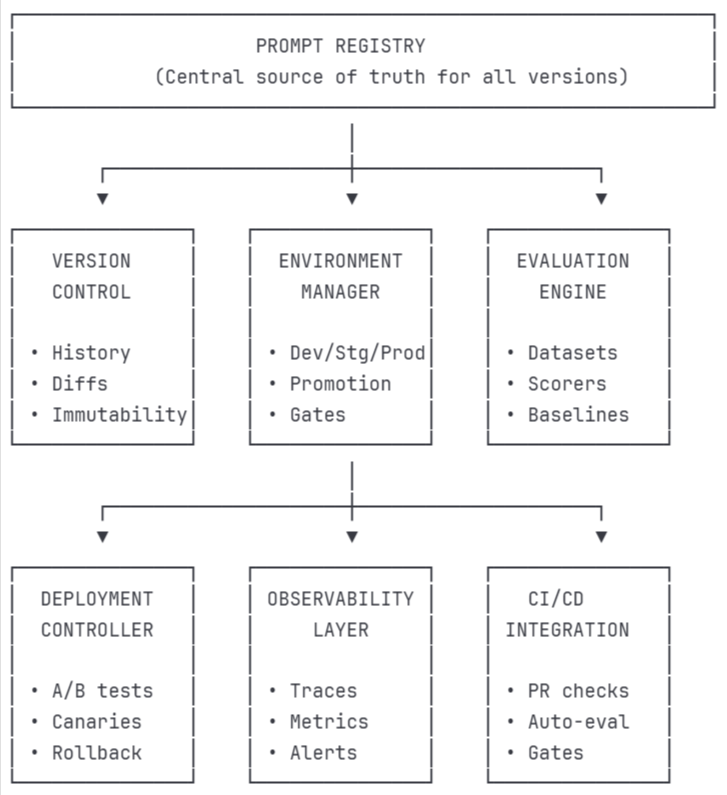
The registry feeds the evaluation engine before deployment, and the deployment controller only promotes versions that pass evaluation. The observability layer sends degradation signals that trigger rollback, and production traces flow back to expand test coverage.
Workflow for moving prompts from prototype to production
This workflow shows how prompt changes move from early experimentation to stable production use, with quality checks and feedback at every stage.
Step 1: Development
Draft the initial prompt in a development environment that supports fast iteration. Use a playground to test against sample inputs and confirm that outputs are reasonable before investing further effort.
Step 2: Dataset creation
Build an evaluation dataset using inputs from production logs, user research, and domain expertise. Include common cases, edge cases, and adversarial inputs to reflect real usage and potential failure modes.
Step 3: Baseline evaluation
Run the prompt against the dataset to establish baseline scores. This surfaces obvious issues early and provides a reference point for measuring future changes.
Step 4: Iteration
Refine the prompt based on evaluation results. Each modification creates a new version, and re-running the evaluation shows whether the change improved quality or introduced regressions.
Step 5: Review
Submit the prompt for review once it meets acceptance criteria. Reviewers inspect diffs, validate test coverage, and confirm that the prompt behaves as intended across use cases.
Step 6: Staging validation
Promote the approved prompt to staging, where it runs against production-like data. Evaluation at this stage builds confidence that the prompt will behave correctly under real conditions.
Step 7: Production deployment
Deploy the prompt using an appropriate rollout strategy based on risk. Low-risk changes can be deployed directly, while higher-risk updates use canary releases or A/B testing to limit exposure.
Step 8: Production monitoring
Monitor quality on live traffic after deployment. Compare production results against staging expectations to detect unexpected behavior early.
Step 9: Feedback integration
Add low-scoring production queries back into the evaluation dataset. This expands coverage over time and ensures that known failures are tested in future iterations.
Together, these steps turn ad hoc prompt changes into a controlled, repeatable process. Changes are validated at each stage, and real production feedback informs future iterations. This approach reduces risk while allowing prompts to evolve safely as products and models change.
Why Braintrust is the right choice for prompt management
Braintrust brings together the full prompt management workflow described in this guide into a single platform built for production LLM applications. It integrates versioning, collaboration, deployment, evaluation, and monitoring into a single system.
Prompt versioning as first-class infrastructure
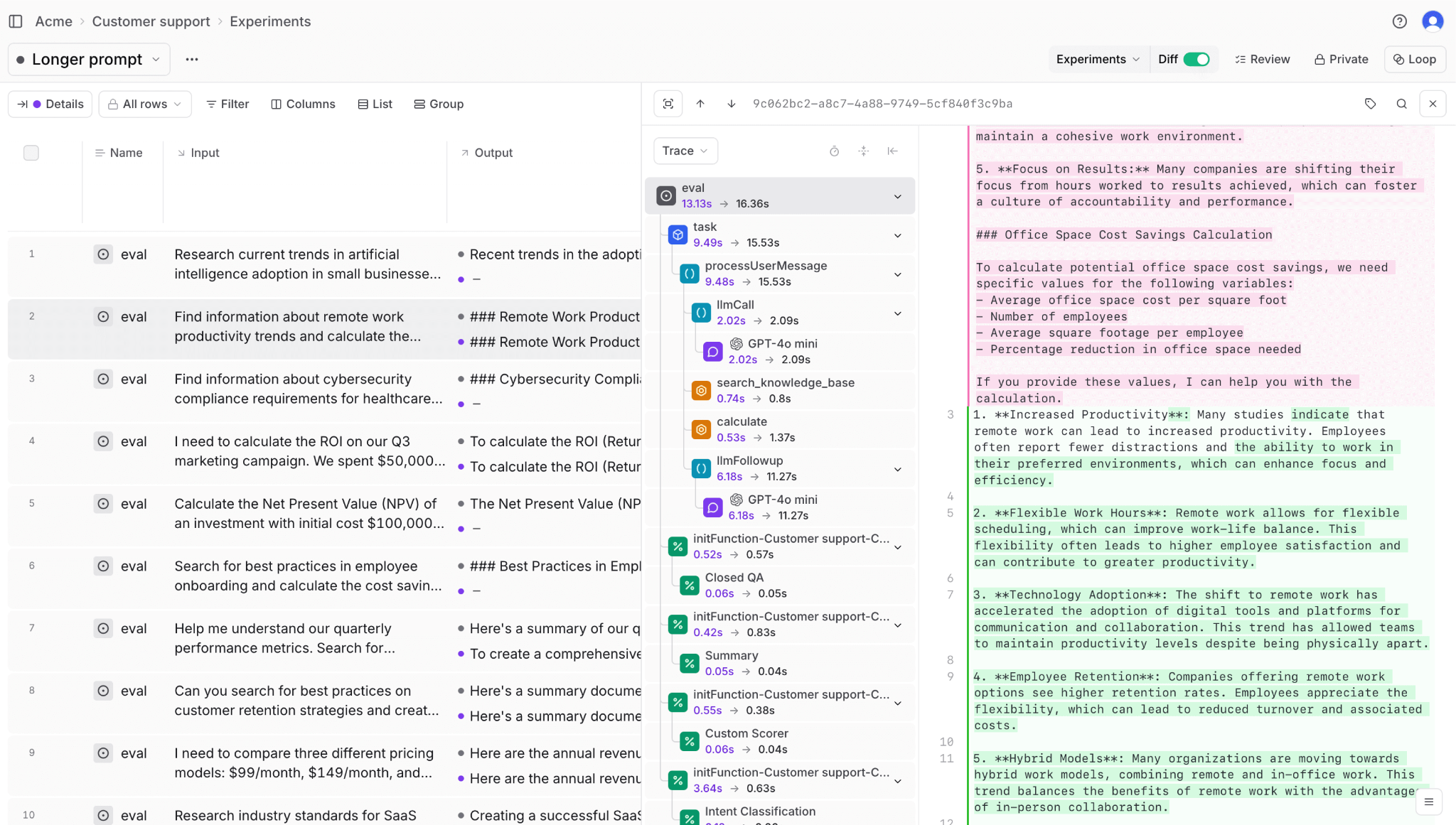
Braintrust treats prompts as versioned, first-class objects. Each change receives a unique identifier, ensuring that the same prompt version can be reproduced reliably across environments and over time. Complete version history with diffs makes it easy to understand exactly what changed and why the behavior shifted.
Safe deployment with environment controls
Deployment is organized around development, staging, and production environments, with quality gates at each stage. Prompt versions that fail evaluation in staging cannot be automatically promoted to production. When issues appear, instant rollback restores a previously validated version without requiring code changes.
Integrated evaluation and quality control
Evaluation is built directly into the prompt lifecycle. Datasets, scorers, and baselines live alongside prompts, allowing quality checks to run in the same interface where changes are made. This tight integration makes it clear whether a modification improved results or introduced regressions before deployment.
Iteration and debugging with Playground and Loop
The Playground supports rapid iteration by allowing prompt changes to be tested against real data in a live evaluation environment. Traces can be inspected, outputs compared side by side, and modifications validated immediately. Loop, the built-in AI assistant, enables test dataset creation and evaluation through natural language, making quality workflows accessible beyond the engineering team.
End-to-end tracing and feedback loops
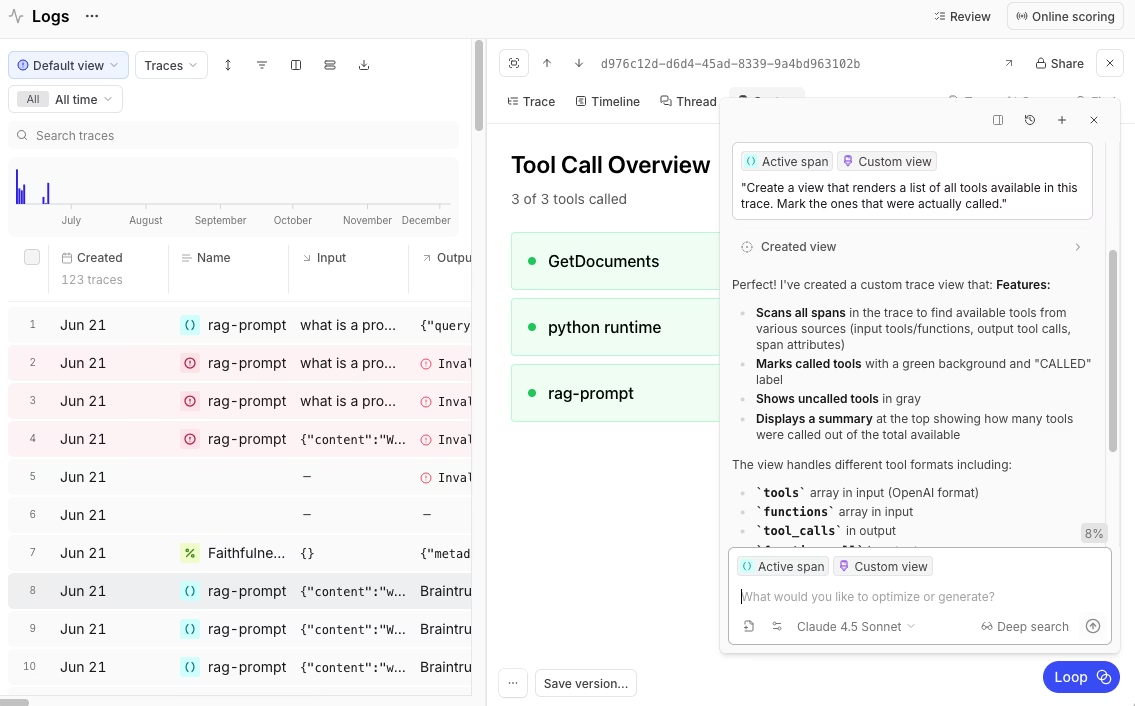
Comprehensive tracing links every output back to the exact prompt version that produced it. When monitoring surfaces a low-scoring production query, it can be added to an evaluation dataset with a single action. This closes the loop between production behavior and future prompt improvements.
Production monitoring and alerting
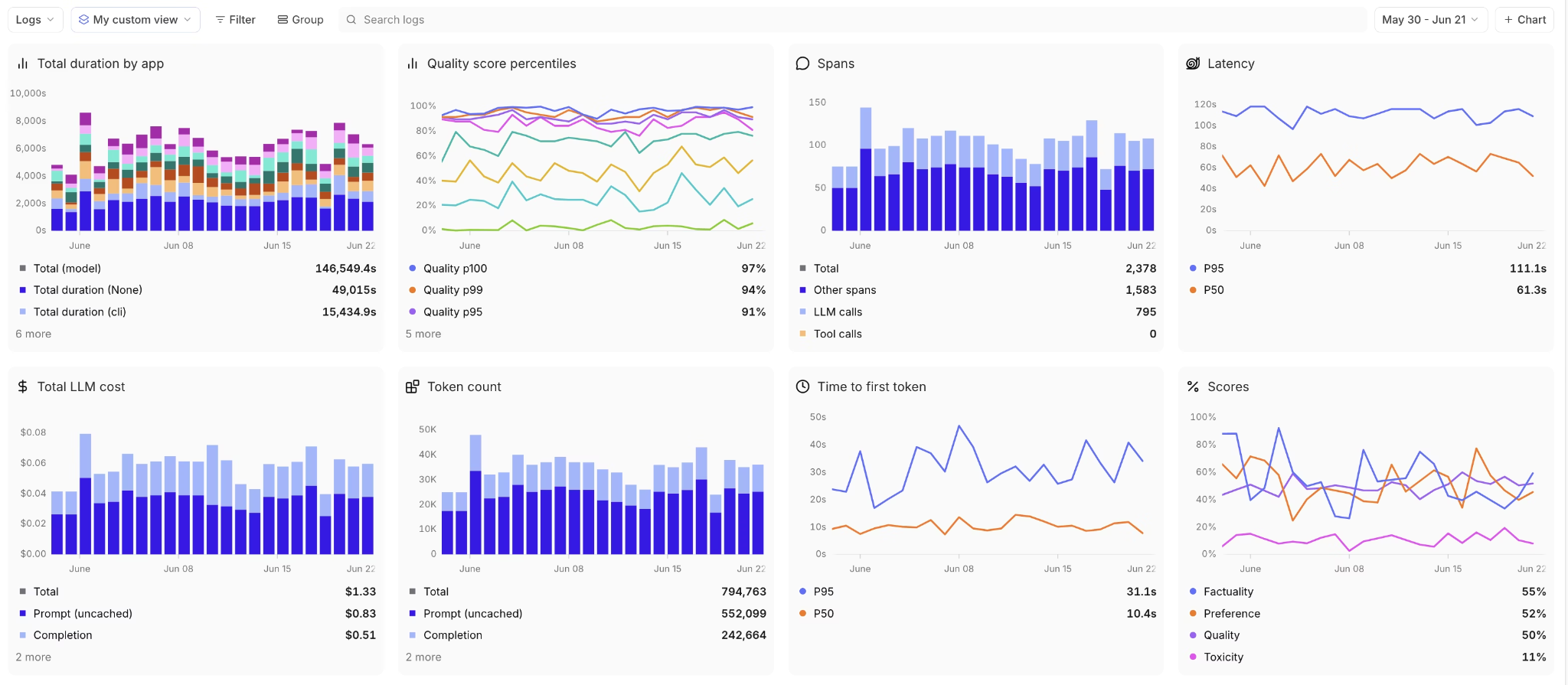
Once deployed, prompt behavior is monitored on live traffic using the same scorers applied during development. Dashboards consolidate quality, latency, and cost metrics in a single view, and alerts are triggered when performance degrades. This ensures production behavior stays aligned with expectations set during evaluation.
CI/CD integration and automated gates
Braintrust integrates with CI/CD through a native GitHub Action that runs evaluation on every pull request. Results are posted directly in PRs, showing which test cases improved or regressed. Merges are gated on quality thresholds, preventing silent regressions from reaching production.
Security, deployment flexibility, and adoption
Braintrust holds SOC 2 Type II certification and supports cloud, hybrid, and self-hosted deployments to meet different security requirements. It is used in production by companies such as Notion, Stripe, Zapier, Instacart, Vercel, and Airtable for prompt management and evaluation.
Get started with Braintrust for free today and bring structure, safety, and confidence to prompt management before issues surface in production.
Conclusion
As LLM applications mature, prompts stop being experimental inputs and become production dependencies. Without structure, small changes add risk, slow iteration, and make failures harder to trace.
Prompt management removes this risk by adding structure and control. It allows prompts to change frequently while remaining observable, testable, and reversible. This is what makes it possible to scale LLM features responsibly as models, products, and usage evolve.
Braintrust provides the complete prompt management workflow in a single platform, from versioning and collaboration through deployment and production monitoring. Get started with Braintrust to bring systematic prompt management to your LLM applications.
FAQs: Prompt management
What is prompt management?
Prompt management is the practice of treating prompts as production assets instead of static text. It includes versioning, testing, deployment, and monitoring so prompt changes can be made safely, tracked clearly, and rolled back when needed. Rather than editing prompts directly in code or documents, prompt management provides structure around how prompts evolve over time.
What is the difference between prompt management and prompt engineering?
Prompt engineering focuses on writing prompts that produce better outputs. It covers techniques such as instructional design, examples, and formatting.
Prompt management focuses on how prompts are handled in production. It covers version control, collaboration, staged deployment, evaluation, and monitoring. Prompt engineering defines what a prompt says, while prompt management defines how that prompt is developed, tested, and maintained over time.
What is regression testing for prompts?
Regression testing for prompts checks whether a new prompt version performs worse than a previous one. It runs the updated prompt against a fixed set of test inputs and compares the results to a baseline. This process helps catch cases where fixing one issue accidentally breaks behavior that was previously working, before the change reaches production.
What tools do I need for prompt management?
Effective prompt management requires several components working together. These include a prompt registry for version control, an evaluation system for quality checks, environment separation for safe deployment, rollout controls to limit risk, and monitoring to track behavior on live traffic.
Braintrust combines these capabilities in a single platform, integrating version control with evaluation and production monitoring so changes can be validated before and after deployment.
How do I get started with prompt management?
A practical starting point is to move prompts out of application code into a centralized system where changes can be tracked independently. From there, create a small evaluation dataset using representative inputs and define clear criteria for what constitutes a good output.
You can validate this workflow by starting with Braintrust's free tier, which includes 1 GB of processed data and 10,000 evaluation scores per month. This provides enough capacity to version prompts, run evaluations on real traffic, and test the full prompt management workflow before committing or scaling further.